

They Wiped 1,000 Devices. ThreatLocker Would Have Stopped It.
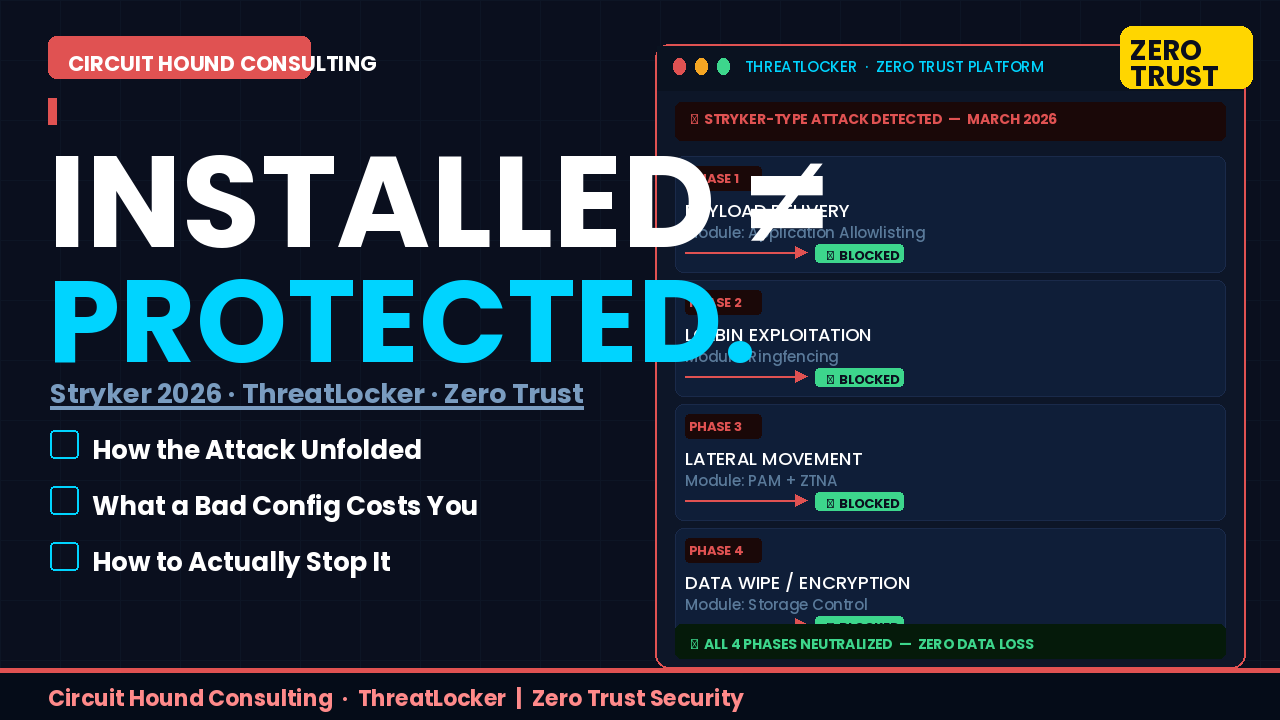
and wiped over 1,000 devices. They didn’t exploit some exotic zero-day. They used
administrative tools that were already there. They abused trusted software.
They hijacked the very management platform designed to protect the environment.
And they did it because the doors were open.
It’s the legitimate tools an attacker can turn against you.”
ThreatLocker is built to prevent exactly this. But here’s the part nobody talks about:
a misconfigured ThreatLocker is almost worse than not having it.
It creates a false sense of security while leaving every door unlocked.
The difference between “protected” and “compromised” isn’t the license —
it’s who configured it.
Let’s walk through how the Stryker attack unfolded, how ThreatLocker
breaks the chain at every phase — and why configuration expertise
is what actually separates the two outcomes.
Phase 1 — Initial Infiltration & Tool Delivery
⚠ Misconfigured — Attack Succeeds
ThreatLocker left in Learning Mode or configured with broad Allowlisting exclusions
— allowing execution from \Downloads\ or \AppData\ —
means the system treats newly introduced malicious binaries as trusted.
The attacker has a foothold before your security team finishes their morning coffee.
✓ Properly Configured — Attack Blocked
Application Allowlisting under a true default-deny policy means
nothing executes unless it is explicitly approved.
That unapproved payload hits the ground dead. No foothold.
No lateral movement to worry about. Attack over — Phase 1.
Phase 2 — Living Off the Land (LOLBins)
This is where modern attackers get clever. They don’t bring their own tools —
they use yours. PowerShell. CMD. vssadmin.
These are legitimate Windows utilities that antivirus never flags,
because they’re supposed to be there.
⚠ Misconfigured — Attack Succeeds
If ThreatLocker’s Ringfencing module is disabled or left at defaults,
a compromised process can reach out to the internet via PowerShell,
manipulate the registry, delete shadow copies with vssadmin,
and download additional payloads. Business as usual for the attacker.
✓ Properly Configured — Attack Blocked
Application Ringfencing puts a hard boundary around every approved application —
including system tools. PowerShell can run, but only within its authorized
scope. It cannot reach the internet. It cannot touch the registry.
It cannot spawn unauthorized child processes. The LOLBin attack chain collapses.
Phase 3 — Lateral Movement & Admin Portal Hijacking
The Stryker attack’s most damaging phase: the attackers got into
Microsoft Intune and used it as a weapon. A device management platform
— purpose-built to push commands to endpoints at scale —
turned into a mass-destruction tool. This is what happens
when standing admin privilege exists and east-west traffic flows freely.
⚠ Misconfigured — Attack Succeeds
Without enforced PAM and Network Control, hijacked admin credentials
give an attacker the keys to everything. They move freely from endpoint
to endpoint. They issue commands through the management portal
as if they’re your own IT team. You don’t find out until the alerts
start piling up — and by then, it’s too late.
✓ Properly Configured — Attack Blocked
ThreatLocker PAM eliminates standing admin privileges entirely,
replacing them with dynamic, time-limited, application-specific
elevations. Zero Trust Network Access (ZTNA) blocks all
device-to-device east-west traffic by default — every connection
must be explicitly authorized. A rogue command from a hijacked portal
lands on a wall. The compromised device identity is rejected.
The attack goes nowhere.
Phase 4 — Data Wiping & File Encryption
The final act. Wipers overwrite. Ransomware encrypts.
Configuration data is destroyed. In the Stryker incident,
the goal wasn’t financial — it was operational devastation.
Over a thousand devices rendered useless.
⚠ Misconfigured — Attack Succeeds
Without Storage Control policies actively in place, any process running
under an elevated context has full read/write/delete access to everything.
Critical directories. Network shares. Databases. All of it.
The wiper does its job and walks away clean.
✓ Properly Configured — Attack Blocked
Storage Control isolates sensitive directories with granular
write-action controls. Even if code somehow executes,
unapproved processes cannot modify, overwrite, or delete
files in protected storage paths.
The wiper launches. ThreatLocker shrugs. Data survives.
The Scorecard
| Attack Phase | ThreatLocker Module | Misconfigured | Properly Configured |
|---|---|---|---|
| Payload Delivery | Application Allowlisting | Compromised | Blocked |
| LOLBin Abuse | Ringfencing | Compromised | Blocked |
| Lateral Movement | PAM + ZTNA | Compromised | Blocked |
| Data Wipe / Encryption | Storage Control | Compromised | Blocked |
The Real Problem Isn’t the Tool. It’s the Configuration.
ThreatLocker is one of the most powerful Zero Trust platforms available today.
I’ve deployed it. I believe in it. But I’ll say this clearly:
is a checkbox, not a defense.
Left in Learning Mode too long — your environment learns to trust the attacker’s tools.
Broad Allowlisting exclusions — you’ve built a bypass into your own security.
No Ringfencing on system utilities — your trusted tools become weapons.
No Storage Control — your data is one compromised process away from gone.
Every module, every policy, every exclusion requires expertise and intentionality.
The Stryker attack didn’t succeed because ThreatLocker can’t stop it.
It succeeded because organizations assume that installed means protected.
It does not.
Circuit Hound Consulting LLC
Don’t Let “Installed”
Mean “Unprotected.”
With 30 years in enterprise IT and cybersecurity, Circuit Hound Consulting
deploys and configures ThreatLocker the right way — default-deny from day one,
Ringfencing built for your environment, Storage Control policies that actually
protect your data, and PAM configured so your admins have what they need
and attackers have nothing.
We don’t leave you in Learning Mode and call it a day.
We build a Zero Trust environment that breaks the attack chain
before it starts — every phase, every time.
Winter Springs, FL · Serving businesses nationwide · No fluff. Just results.